Showing posts with label Techie. Show all posts

20 May 2011

Why do we so like Windows?


windows is ruining our lifetime good mood!
since Win2000, microsoft have made a good GUI user wise OS.
since then we've been stuck to UI. we always depends to UI. no more command-line program.
but honestly UI make us do more to do simple task.
like clicking this, that, and that just to open a file.
sangat susah dan menyusahkan.

19 April 2011

Great secret revealed! How to fake web pages?

hello dear readers..
you might remember last entry about usop wilcha facebook. 
 
dou you ever thought how to do it?

macam mane nak buat website facebook versi usop wilcha?

tau? tau ke x?

macam atas ni?

dan begitu juga seperti ribuan faked website pages yang anda pernah lihat sebelum ni?

ini jawapannya!

07 April 2011

How to know your site's IP address?

just so for your information, you might need to know your site's IP address. here it is.

you can check it out here at this Online URL To IP Converter.
 

its a handy tool easily for you to know the IP address of any site you desire for.

just simply tye in the proper address @ URL and click "Get IP Info".

Done.

06 April 2011

How to add "Related Post" to your blog?


2. fill in your email, blog link platform and set the width to show how many post in it. note that you might need to login to your email.

3. click Get Widget


4. click "Install Widget". for the rest, follow the instruction.

5. Done!

08 January 2011

Usefull Sites for downloading Apps, Games, etc.

Here is some usefull links to download various of application.

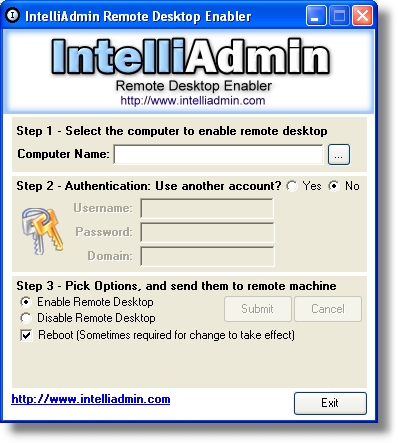
How to enable Remote Desktop remotely?


Remote desktop is a nice feature of Windows 2003, XP, and 2000 server that lets you remotely login to, and work on the system as if you were there. It's a cool feature of Windows Server 2003 that lets you remotely log on to and work at a machine as if you were seated at the local console (in Windows 2000 Advanced Server, this feature was called Terminal Services in Remote Administration Mode). Remote Desktop can be a lifesaver for fixing problems on servers at remote sites, but what if you forgot to enable the feature before you shipped the server out to Kalamazoo?

Enabling Remote Desktop is easy if the server is in front of you: just log on as an administrator, open System in Control Panel, select the Remote tab, and under Remote Desktop select the checkbox labeled "Allow users to connect remotely to this computer." Unfortunately, you can't use the System utility to enable Remote Desktop on a remote machine, though you can access some properties pages of System using Computer Management by first connecting the console to a remote computer, then right-clicking on the root node and selecting Properties.

03 January 2011

Windows 8 Rumors & News!


Microsoft is pretty tight lipped when it comes to the release of the next version of Windows, which for now is known as Windows 8. Many experts have predicted that Windows 8 will be released in three year’s time after the release of Windows 7, which would suggest a release in the last quarter of 2012 in the most important markets.

10 serious problems with touchscreens!

Would like to change to touch-screen phone? Sure you can. But just in case the whole anticipation thing is becoming a bit too much for you to bear, here’s a small list of things to ponder while you’re waiting. These info might obsolete already, but at least you should know the root problem of it..

29 December 2010

Fix Svchost.exe Application Error – Memory Could Not Be Written

Svchost.exe application errors usually occurs after (or during) Windows Updates before your previous shutdown. Even if you start your PC in Safe Mode (by pressing F8 key during boot up), you will still receive the “Memory could not be written” error message.  If your technical, you can check your event log file and should be able to find out what process is actually causing the problem.

Why do you see "Generic Host Process for Win32 Services has encountered a problem" or similar error messages?

The are several possible reasons of this error message.


Reason 1: You have one of numerous worms, viruses and trojans which pretent themselves to be legal svchost.exe or use legal svchost.exe to run themselves at windows startup. These threats include: CashToolbar Downloader-MY, System1060, CoolWebSearch Svchost32, ADCLICK-AG, ADCLICK-AX, ADUYO-A, AGENT-V, AGOBOT-KL, AUTOTROJ-C and many others.


Reason 2: Some legal DLL which uses svchost.exe to run itself at Windows startup crashed and causes crash of the whole svchost.exe service.


Reason 3: You have just installed update from Microsoft which contains errorneous verison of Windows Installer or double-byte character set (DBCS) characters support (only occures in Microsoft Windows XP Service Pack 2 (SP2)).


Reason 4: You installed old printer or scanner drivers from Hewlett-Packard which are incompatible with the current version of svchost.ex

Related Posts Plugin for WordPress, Blogger...